 Skip to content
You build an agent that works beautifully for one session.
It finds the test command. It learns that this repo uses uv run. It notices that the user prefers typed Python functions. It discovers the deployment foot-gun that broke things last time.
Then the session ends.
The next run starts from zero: same questions, same repository archaeology, same wasted LLM calls. The agent did the work, but the work did not survive.
That is the amnesia problem. Your agent should not have to rediscover the repo every time.
Kitaru now ships durable, versioned memory for agents: artifact-backed state you can set, get, inspect, delete, and audit across Python, the typed client, the CLI, and MCP.
The amnesia problem
Agents collect useful facts while they work:
- “This repo uses
pytest, notunittest.” - “The safe command is
just test, but start with a targeted test first.” - “The user prefers type hints and
uv run.” - “Last time this deployment failed because the container did not know its own user.”
- “This customer wants short bullet-point updates, not long prose.”
Today, most of those facts live in fragile places.
You can stuff them into a system prompt, but then your prompt becomes a junk drawer: hard to update, hard to audit, and always competing with the task itself for context window space.
You can bolt on a separate memory service, but then memory becomes a second database with its own failure modes and its own version of the truth. The agent did something in one system, remembered something in another, and now you have to stitch the story back together later.
You can write local state files, but that is usually just a scratchpad with better branding. It works until you need version history, multiple access surfaces, or a clear answer to the question: “who taught the agent this?”
As Sarah Wooders put it, asking to plug memory into an agent harness is like asking to plug driving into a car. Memory is not just a place to dump facts. The harness has to decide what survives, when it is read, how it is updated, and how those updates relate to the work the agent actually did.
That is why we built memory into Kitaru’s durability layer. Not as a separate database. Not as a bolt-on scratchpad. Memory uses the same artifact-backed storage substrate that already backs checkpoint outputs, with a retrieval model designed for durable agent state.
What shipped
The smallest version looks like this:
from kitaru import memory

memory.configure(scope="my_repo", scope_type="namespace")

memory.set("conventions/test_runner", {
    "command": "just test",
    "notes": "Start targeted, then run the full suite.",
})

conventions = memory.get("conventions/test_runner")
entries = memory.list()
history = memory.history("conventions/test_runner")

memory.delete("conventions/test_runner")
That is the core loop: configure a typed scope, write a value under a stable key, recall it later, inspect what exists, inspect how it changed, and soft-delete it when it should no longer be current.
The feature ships across four surfaces:
kitaru.memoryfor Python flows and scriptsKitaruClient.memoriesfor typed inspection and admin codekitaru memory ...on the CLI for shell workflowskitaru_memory_*MCP tools for Claude Code, Cursor, and other MCP-compatible assistants
Admin operations like compaction, purge, and the maintenance audit log are available through KitaruClient, the CLI, and MCP for managing memory growth over time.
The important part is not just that Kitaru has a key-value API. The important part is where the values live: in the same versioned storage substrate as your durable execution artifacts.
Memory is a shelf, not a box
There are two storage patterns in Kitaru, and the distinction matters.
Artifacts are labeled boxes tied to a particular execution or checkpoint. You fetch them later by saying, in effect: “give me the output from that run.”
Memory is a labeled shelf. You put a value under a stable key and later ask for “the current value on the conventions/test_runner shelf.” You do not need to know which run last put it there. You ask by key, inside a typed scope, and get the latest live value.
| Use this | When |
|---|---|
| Artifact | You want to inspect a specific checkpoint output from a specific execution. |
| Memory | You want the latest durable fact under a stable key. |
Under the hood, memory entries are artifact-backed and versioned. The overlap is intentional. The difference is how you retrieve them: artifacts by execution identity, memory by scope_type + scope + key.
Scopes: where memory lives
Each memory entry belongs to a typed scope. The scope answers a simple question: “where should this memory be visible?”
| Scope type | Meaning | Example use |
|---|---|---|
namespace | Shared state across many flows and runs | repo conventions, user preferences, team config |
flow | State associated with one flow or agent | what this agent has learned across runs |
execution | State isolated to one run | per-run progress, scratch notes, temporary state |
Outside a flow, you configure the scope before reading or writing. This is useful for seeding memory before an agent runs:
from kitaru import memory

memory.configure(scope="repo_docs", scope_type="namespace")

memory.set("conventions/test_runner", {
    "command": "just test",
    "notes": "After code changes, rerun the tests.",
})
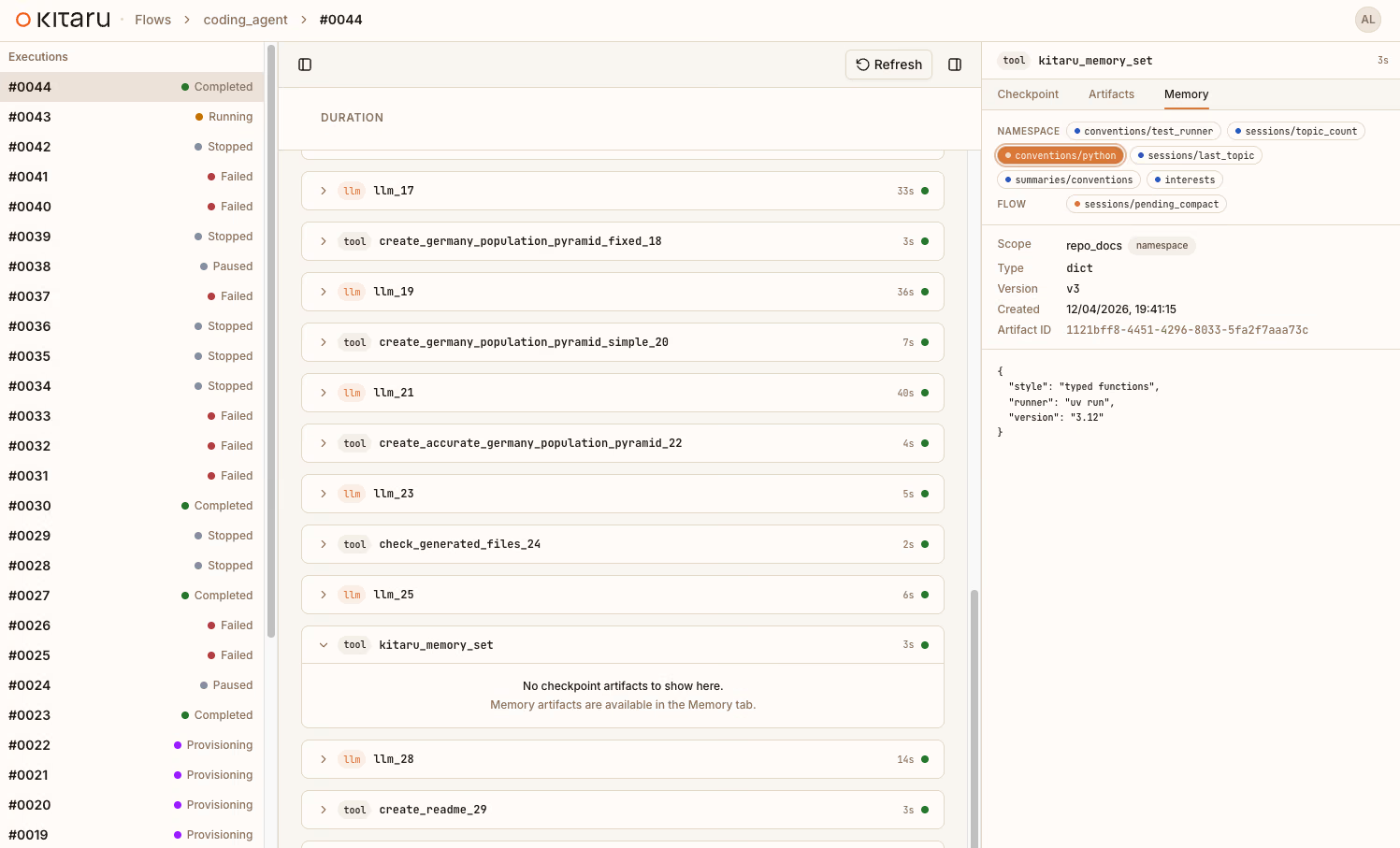
memory.set("conventions/python", {
    "style": "typed functions",
    "runner": "uv run",
    "version": "3.12",
})
memory.set("sessions/topic_count", 2)
Inside a flow, Kitaru can default to the active flow context. You can also choose a namespace or execution scope explicitly. The shipped memory example does exactly that: it reads repo-level conventions from namespace memory, writes per-run progress into execution memory, and records a flow-level summary for future runs.
Memory in a flow
The pattern is deliberately simple:
- Read memory in the flow body.
- Pass memory values into checkpoints as arguments.
- Let checkpoints do durable, cacheable work.
- Write updated memory back from the flow body after the relevant checkpoint outputs exist.
Distilled from examples/memory/flow_with_memory.py, it looks like this:
from kitaru import checkpoint, flow, memory

@checkpoint
def capture_initial_state(topic, test_runner, python_defaults, topic_count):
    return {
        "topic": topic,
        "test_runner_command": test_runner["command"],
        "python_runner": python_defaults["runner"],
        "topic_count": topic_count,
    }

@checkpoint
def increment_topic_count(current):
    return current + 1

@flow
def repo_memory_demo(namespace_scope: str, topic: str) -> None:
    memory.configure(scope=namespace_scope, scope_type="namespace")
    test_runner = memory.get("conventions/test_runner")
    python_defaults = memory.get("conventions/python")
    topic_count_before = memory.get("sessions/topic_count")

    capture_initial_state(topic, test_runner, python_defaults, topic_count_before)

    next_topic_count = increment_topic_count(topic_count_before)
    memory.set("sessions/topic_count", next_topic_count)
    memory.set("sessions/last_topic", topic)

    memory.configure(scope_type="execution")
    memory.set("progress/phase", "analysis")

    memory.configure(scope_type="flow")
    memory.set("summaries/latest", f"Prepared {topic}")
Memory reads and writes happen in the flow body, not inside checkpoints. That is deliberate: checkpoints can be cached or replay-skipped, while memory I/O needs to actually run. The memory concept docs cover the rule in more detail.
There is one practical consequence worth calling out. In-flow memory.get(), memory.list(), memory.history(), and memory.delete() behave like runtime step outputs, not ordinary eager Python values. When you need normal Python logic over a memory value, pass it into a checkpoint as an argument, as the example does above.
What this enables
Now imagine a repo-aware coding agent with this pattern baked in.
On the first run, it discovers how the repo works: the test command, the package manager, the shape of the docs, the weird deployment rule nobody remembers until it breaks. After verification checkpoints pass, it writes the confirmed facts into memory.
On the second run, it does not start with archaeology. It reads the conventions from memory, skips the rediscovery loop, and spends its budget on the new task.
That is the difference between a clever single-session assistant and an agent that accumulates useful operational knowledge over time.
We are building toward repo-aware coding agents that combine memory with durable checkpoints, human approval gates, and MCP access. The memory primitive is the foundation for that.
Versioned, not overwritten
Memory is not “overwrite and pray.” Every memory.set() creates a new version.
memory.set("draft/status", "draft")
memory.set("draft/status", "approved")

current = memory.get("draft/status")
history = memory.history("draft/status")
memory.get() returns the latest live value. memory.history() shows the trail.
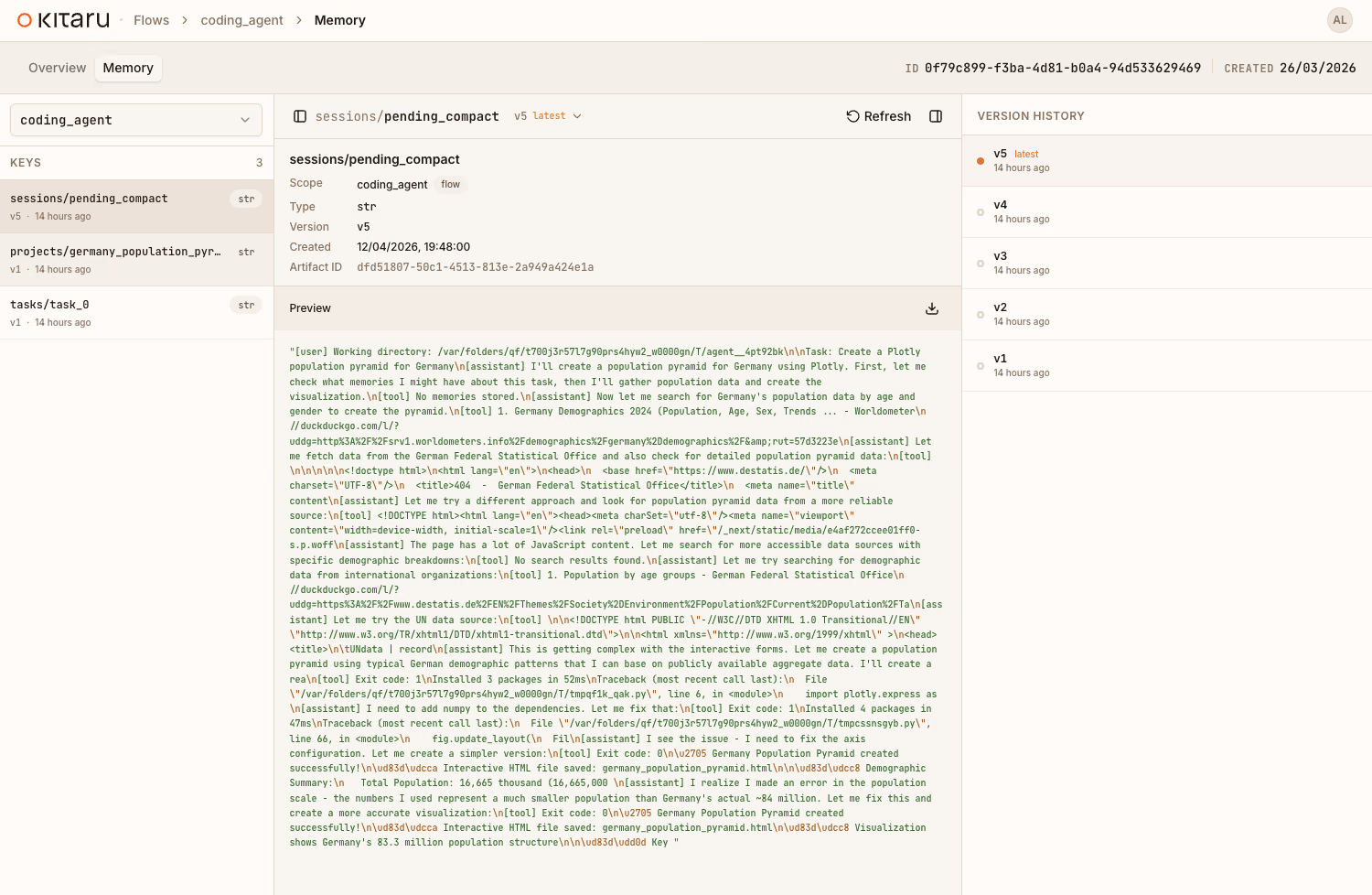
Deletes are soft deletes. When you call memory.delete("key"), Kitaru writes a tombstone: a version that says “this key was deleted here.” Think of it like crossing out an entry in a logbook rather than ripping out the page. The old entries are still readable, but the most recent line says “removed.”
memory.set("scratch/obsolete", {"status": "old snapshot"})
memory.delete("scratch/obsolete")

assert memory.get("scratch/obsolete") is None
history = memory.history("scratch/obsolete")
After a delete, get() returns None and list() hides the key. history() still shows previous values and the tombstone.
That gives you an audit trail today and leaves room for richer workflows later. You can ask what the agent believed three runs ago. You can see when a value changed. You can tell whether a key disappeared because it was explicitly deleted, not because somebody lost a file.
Four surfaces, one memory
The same stored memory is available from Python, the typed client, the CLI, and MCP. The affordances differ by surface, but the storage contract is shared.
Python module API:
from kitaru import memory

memory.configure(scope="repo_docs", scope_type="namespace")
memory.set("style/release_notes", {"tone": "concise", "format": "bullets"})
style = memory.get("style/release_notes")
Typed client:
from kitaru import KitaruClient

client = KitaruClient()
entries = client.memories.list(scope="repo_docs", scope_type="namespace")
latest = client.memories.get(
    "style/release_notes",
    scope="repo_docs",
    scope_type="namespace",
)
CLI:
kitaru memory scopes
kitaru memory list --scope repo_docs --scope-type namespace
kitaru memory get style/release_notes --scope repo_docs --scope-type namespace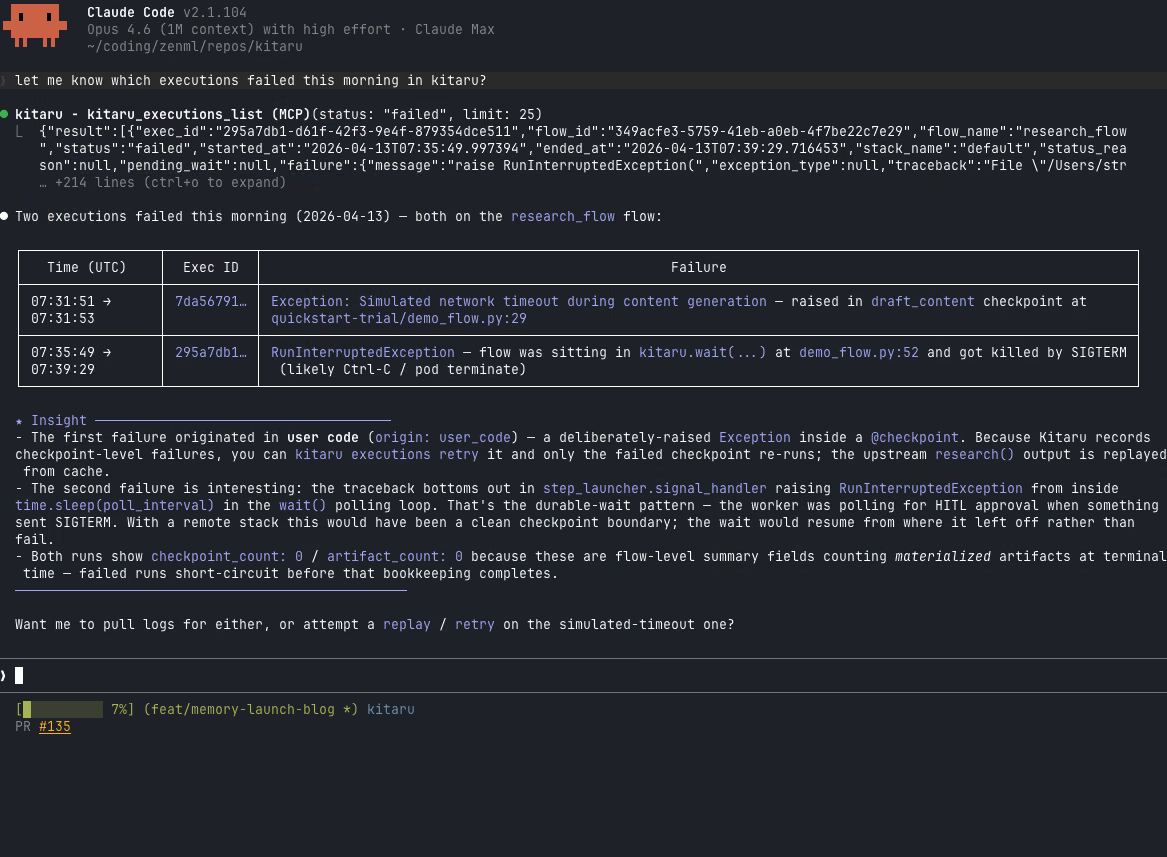
MCP tools:
kitaru_memory_list(scope="repo_docs", scope_type="namespace")
kitaru_memory_get(
    key="style/release_notes",
    scope="repo_docs",
    scope_type="namespace",
)
That last surface is especially interesting for agent development. An assistant can inspect what an agent knows, read a specific entry, or seed memory before a run without writing Python at all.
| Surface | Scope | Version reads | Admin ops |
|---|---|---|---|
kitaru.memory | configured once | yes | no |
KitaruClient.memories | explicit per call | yes | yes |
| CLI | --scope + --scope-type | latest on get; use history for versions | yes |
| MCP | explicit tool args | yes | yes |
One memory system, four ways in.
Who taught the agent this?
A memory system is only trustworthy if you can inspect where its values came from.
The shipped example makes this concrete with the sessions/topic_count key.
First, a script seeds namespace memory before the flow starts:
memory.configure(scope="repo_docs", scope_type="namespace")
memory.set("sessions/topic_count", 2)
That creates a detached version. It belongs to the repo_docs namespace, but it was not produced by a live flow execution, so its execution_id is None.
Then the flow reads that count, increments it through a checkpoint, and writes the new value back inside the flow body:
topic_count_before = memory.get("sessions/topic_count")
next_topic_count = increment_topic_count(topic_count_before)
memory.set("sessions/topic_count", next_topic_count)
That second version is linked to the execution that produced it.
The distinction is useful:
scopetells you where the memory belongs.execution_idtells you whether that specific version was produced during a live flow run.
Manual seeds are visibly manual. Agent-learned values are linked to the execution that produced them. When something starts behaving strangely, you can inspect the history and ask a concrete question: “which run taught the agent this?”
What we did not build
Memory in 0.4.0 is a foundation, not a claim that every memory-shaped feature is done.
| Feature | Status |
|---|---|
| Semantic/vector search | Not shipped |
| Rollback/fork APIs | Not shipped |
| Conversation thread memory | Deferred |
| Replay-deterministic memory | Not promised today |
| Memory inside checkpoints | Forbidden by design |
| Distributed locking / compare-and-swap | Not shipped |
| Compaction, purge, and maintenance audit log | Shipped |
The current concurrency model is last-writer-wins. If two flows write to the same key at the same time, both writes create versions. The latest version wins on get(). Earlier versions are not lost; they remain visible in history().
For the workflows we see most often, that is the right tradeoff. Execution scope is per-run. Flow scope is usually written by one agent shape. Namespace scope is often seed-and-read: populate conventions before the run, read them during the run, update deliberately afterward.
If a future use case needs several agents coordinating through the same namespace in real time, the versioned foundation gives us room to add stricter controls. We did not ship that complexity before the use case demanded it.
Try it yourself
From a repo checkout:
git clone https://github.com/zenml-io/kitaru.git
cd kitaru
uv sync --extra local
uv run examples/memory/flow_with_memory.py
The example runs the memory story end to end: seeding, flow execution, inspection, provenance, and maintenance where a model is configured.
kitaru model register default --model openai/gpt-5-nano
uv run examples/memory/flow_with_memory.py
You can also ask for a structured snapshot or skip the maintenance section:
uv run examples/memory/flow_with_memory.py --output json
uv run examples/memory/flow_with_memory.py --skip-maintenance
If you just want the smallest package-installed taste:
uv pip install kitarufrom kitaru import memory
memory.configure(scope="quickstart", scope_type="namespace")
memory.set("greeting", "hello from memory!")
print(memory.get("greeting"))
print(memory.history("greeting"))Continue in the docs
Memory makes agents less forgetful. Durability makes that memory inspectable.
Your agent should not have to rediscover the repo every time. Now it does not have to.